


Space Station 14 server hosting
Your own Space Station 14 station, with your rules and your admins
Host a Space Station 14 server for round-based roleplay on a station that keeps going wrong. Free and open source, with your own rules, admins and crew size.
Staying longer? Subscribe and get 50% off your first month
- DDoS protected
- 24/7 support
- Live the moment you pay
- Split the billUp to 10 friends, own cards
- Custom plansAny RAM up to 32 GB
- Prepaid or monthly3 days to 1 year
- Live in 60 secondsNo setup, no waiting
- Cancel any timeNo contracts, ever
Pick your Space Station 14 plan
Every plan is live the moment you pay. Upgrade or cancel from your dashboard any time.
Starter
3 GBThen $7.99/mo. $0.27 a day.
- 3 GB RAM
- 2 vCPU cores
- DDoS protection included
- 24/7 support
Standard
4 GBThen $9.99/mo. $0.33 a day.
- 4 GB RAM
- 2 vCPU cores
- DDoS protection included
- 24/7 support
Pro
8 GBThen $19.99/mo. $0.67 a day.
Splitting with 3 friends? $6.02 each/mo
- 8 GB RAM
- 2 vCPU cores
- DDoS protection included
- 24/7 support
What comes set up on a Space Station 14 server
Your rules, your admins
Set login_host_user in server_config.toml so you become host when you join, then hand out admin permissions to your staff in game.
Crews of any size
From a 15 person roleplay night to a packed public round, set the player cap that suits your station and admin team.
Account authentication
Require SS14 accounts so bans stick and every player has a known identity, or relax it for a private test server.
Listed on the hub
Advertise the server to the launcher's public server list from its config, or keep it unlisted for friends only.
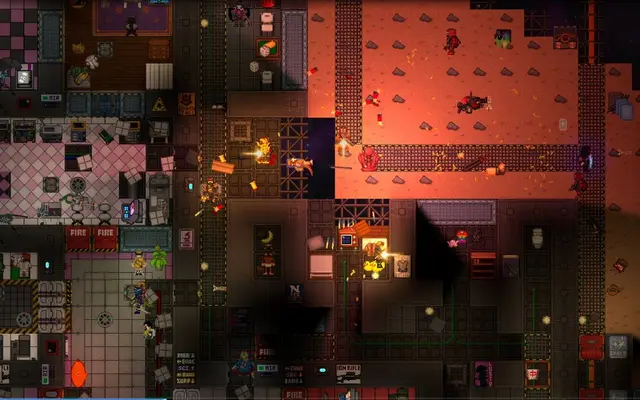
A look inside Space Station 14
Real screenshots from the game. Click any of them to see it full size.
How much RAM does a Space Station 14 server need?
Find the row that sounds like your group and we will point you at the right plan.
| Your server | RAM | Plan |
|---|---|---|
| Friends' server, 10 to 20 players | 3 GB | Starter$7.99/mo |
| Public rounds with 40 to 60 players | 4 GB | Standard$9.99/mo |
| High population server with big maps | 8 GB | Pro$19.99/mo |
This is the panel. Click around.
This is the Space Station 14 panel you get. Click any button, or type a command.

Space Station 14 Server
play.gamezservers.com:7777
[12:00:00] Starting Space Station 14 server
[12:00:03] Loading world
[12:00:06] Server started on port 7777
[12:00:09] Ready for players. Try a button.
Power
How to join your Space Station 14 server
- 1
Download the free Space Station 14 launcher and create an account.
- 2
Open the launcher and sign in.
- 3
Click Direct Connect To Server.
- 4
Enter
203.0.113.24and click Connect. The launcher downloads the right game version for you.
Common problems
Nobody is admin on a fresh server. Set login_host_user = "YourName" in the [console] section of server_config.toml with your SS14 username, restart, and you get full rights when you join.
Players connect through the launcher, not a game client. Point them to Direct Connect To Server and 203.0.113.24.
Want custom maps, jobs or a fork's content? The packaged server runs the official game build. Custom content needs your own build uploaded over SFTP.
Leave Server tickrate at 60 unless you know why you are changing it. Higher costs CPU every tick.
Server not responding
Make sure the server is online. Servers sleep after 4 days with nobody playing, and anyone with access can start them again from the dashboard in one click.
Use the server address
Do not use localhost, 127.0.0.1 or your own IP from a home hosting guide. Copy the exact address of the server.
No port forwarding or firewall changes
Opening ports on your router is only for hosting a server at home, so there is nothing to change to join this one. If Windows asks whether to let the game through the firewall, choose Allow.
Space Station 14 server hosting, explained
Space Station 14 is a free, open source remake of the cult classic Space Station 13. Every round is a shift aboard a station: you might be a chemist, a security officer, a janitor or the captain, and somewhere in the crew there may be a traitor. Things go wrong constantly, from fires and hull breaches to coworkers with questionable plans. Rounds end with the shuttle home, or the station in pieces.
Rules and roleplay standards are what separate SS14 communities. Some servers are relaxed and chaotic, others run strict medium or heavy roleplay with whitelisted command jobs. Running your own server is about control: your rules, your admins, your crew size, and a place your regulars know. Admin tools in game cover bans, smites, ghost observing and event spawning. Your server, your bans and appeals, your idea of good roleplay.
Our panel covers the server name, tickrate, max players and whether players must authenticate with an SS14 account. The rest of the config, including hub listing, game modes, round timers and admin setup, lives in server_config.toml in the file manager or over SFTP. Players connect through the free official launcher using Direct Connect, and it fetches the right build automatically.
Memory rises with crew count and station size. A friends' server with 10 to 20 players runs on 3 GB. Public rounds with 40 to 60 players sit comfortably on 4 GB, and a high population server or large custom maps want 8 GB. CPU matters a lot for SS14 atmospherics and physics, so watch the console for tick warnings as you grow.
Space Station 14 server guides
Space Station 146 min readSpace Station 14 Admin Commands, Ranks and Permission Flags
Set up admins on your own Space Station 14 server: permission flags, admin ranks, the F7 admin menu, and the commands for bans, aghost, rounds and kicks.
ReadSpace Station 146 min readSpace Station 14 Game Modes and Round Settings for Your Server
Change the game mode on a Space Station 14 server: defaultpreset, secret, fallback, player minimums, role timers, lobby time, shuttle timing and votes.
ReadSpace Station 147 min readHow to Host a Space Station 14 Server (2026 Guide)
Host a Space Station 14 server: Robust.Server on .NET 10, port 1212 UDP and TCP, server_config.toml key by key, getting admin, player caps and the hub.
ReadIncluded on every plan
- Always on DDoS protection
- 24/7 support from real people
- Low ping game hardware
- Live the moment you pay
- Your own address and port
- Live console with full access
- One click game actions
- One click backups
- Upgrade or cancel any time
Common questions
Is Space Station 14 free?
Yes. It is free and open source. Players download the official launcher, and an SS14 account is free too.
How many players can a Space Station 14 server hold?
Our setup allows up to 256. Most rounds feel best well below that, so set a cap that suits your station and admin team.
How do players connect?
Open the SS14 launcher, choose Direct Connect To Server, enter the server address and connect.
How do I make myself admin?
Set login_host_user to your SS14 username in the [console] section of server_config.toml and restart. Then grant other admins permissions in game.
Can I list my server publicly?
Yes. Turn on hub advertising in server_config.toml and the server shows in the launcher's public list. Follow the hub rules, or leave it unlisted for friends.
Can I run a fork or custom content?
The default server runs the official build. A fork means uploading your own server build, which you can do over SFTP if you know your way around it.
What does the tickrate setting do?
It is how many times per second the server updates the game. Higher feels smoother but costs more CPU, so leave the default of 60 unless you have a reason.
Should I require authentication?
For anything public, yes. Without it, bans are easy to dodge because players are not tied to an account.
Is GamezServers affiliated with Space Station 14?
No. You rent and control your own dedicated Space Station 14 server. GamezServers is not affiliated with the game's developer or publisher.
Can my friends and I split the cost?
Yes. At checkout choose "Me and my friends" and up to 10 people each pay their own share with their own card, on any plan length, from 3 days to a year. It is not a payment plan: nobody pays in parts over time, each friend simply pays their own share. You pay yours, send each friend their link, and the server starts straight away. Each share includes a $1 payment fee.
Can I build a custom plan?
Yes. Every game has a Build your own page: pick any amount of RAM up to 32 GB, any length from 3 days to 1 year, prepaid or a subscription, plus your server type and settings. A custom size costs 15% more per GB than the standard plans next to it.
Can I pay once instead of a subscription?
Yes. Pick Prepaid and pay once for 3 days, 30 days, 6 months or a year. Nothing renews: when the time is up the server pauses and keeps its world for 14 days. Add time or switch to a subscription from your panel any time. Short rentals cost more per day, since every server is set up from scratch.
How fast is setup, really?
Your server starts building the moment Stripe confirms payment. Most are online in under a minute, and the address and login appear on your dashboard automatically.
Players who host Space Station 14 also host

Your Space Station 14 server is a minute away
Your own Space Station 14 station, with your rules and your admins
Deploy Space Station 14 nowLive in 60 seconds · Cancel any time
GamezServers is not affiliated with Space Wizards. Space Station 14 and its art are trademarks of their respective owners.