


Archean server hosting
Shared Archean planets where your rovers and rockets stay put
Host an Archean server for your engineering crew: shared planets in creative or adventure mode, admins by Steam ID and builds that stay between sessions.
Staying longer? Subscribe and get 50% off your first month
- DDoS protected
- 24/7 support
- Live the moment you pay

- Split the billUp to 10 friends, own cards
- Custom plansAny RAM up to 32 GB
- Prepaid or monthly3 days to 1 year
- Live in 60 secondsNo setup, no waiting
- Cancel any timeNo contracts, ever
Pick your Archean plan
Every plan is live the moment you pay. Upgrade or cancel from your dashboard any time.
Starter
8 GBThen $19.99/mo. $0.67 a day.
Splitting with 3 friends? $6.02 each/mo
- 8 GB RAM
- 2 vCPU cores
- DDoS protection included
- 24/7 support
Standard
12 GBThen $29.99/mo. $1.00 a day.
Splitting with 3 friends? $8.52 each/mo
- 12 GB RAM
- 3 vCPU cores
- DDoS protection included
- 24/7 support
Pro
16 GBThen $39.99/mo. $1.33 a day.
Splitting with 3 friends? $11.02 each/mo
- 16 GB RAM
- 4 vCPU cores
- DDoS protection included
- 24/7 support
What comes set up on a Archean server
Creative or adventure
Switch between free building and resource gathering with the Game Mode setting, and choose Earth or the Moon as the spawn.
Code that keeps running
Your XenonCode programs, flight computers and machines stay in the world, so builds pick up where you left them.
Admins by Steam ID
List admin Steam IDs in the panel. Admins get the F4 server panel to watch performance, teleport players and ban.
Tick rate controls
Advanced settings for updates per second and physics steps let you trade precision for speed on heavy builds.
A look inside Archean
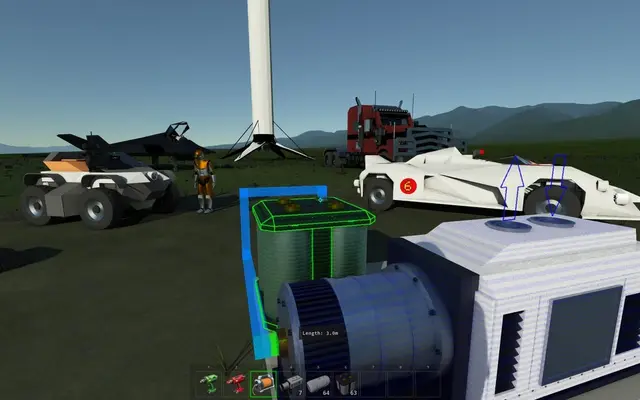
Real screenshots from the game. Click any of them to see it full size.
How much RAM does a Archean server need?
Find the row that sounds like your group and we will point you at the right plan.
| Your server | RAM | Plan |
|---|---|---|
| Small crew, modest builds | 8 GB | Starter$19.99/mo |
| Bigger machines or more active builders | 12 GB | Standard$29.99/mo |
| Full server of 16 with large physics builds | 16 GB | Pro$39.99/mo |
This is the panel. Click around.
This is the Archean panel you get. Click any button, or type a command.

Archean Server
play.gamezservers.com:7777
[12:00:00] Starting Archean server
[12:00:03] Loading world
[12:00:06] Server started on port 7777
[12:00:09] Ready for players. Try a button.
Power
How to join your Archean server
- 1
Start Archean on Steam to open its launcher.
- 2
Find your server in the public list if Online Mode is on, or enter the IP and port from
203.0.113.24by hand. - 3
Enter the password if you set one in the panel.
- 4
Press Play to load into the shared world.
Common problems
Leave Online Mode off for a private server and give friends the IP and port. Turn it on, with a server name set, to show up in the launcher's public list.
Big physics builds slowing everyone down? Lower Physics steps per update a little before upgrading. The server leans on single core speed more than memory.
Admins must be added as Steam64 IDs, one per line. Look yours up at steamid.io and restart after editing.
Server not responding
Make sure the server is online. Servers sleep after 4 days with nobody playing, and anyone with access can start them again from the dashboard in one click.
Use the server address
Do not use localhost, 127.0.0.1 or your own IP from a home hosting guide. Copy the exact address of the server.
No port forwarding or firewall changes
Opening ports on your router is only for hosting a server at home, so there is nothing to change to join this one. If Windows asks whether to let the game through the firewall, choose Allow.
Archean server hosting, explained
Archean is a physics driven engineering sandbox set in a full scale solar system. You gather resources, build components, then assemble rovers, bases and spacecraft and program how they behave with the in game XenonCode language. Multiplayer is co-op: a small crew works on the same planet, one person wiring the flight computer while another drills for ore. Creative mode plays like a shared workshop, while adventure mode makes resources and survival matter.
Archean can open a single player world to friends, but that world disappears when the host quits. A dedicated server keeps the planets running so builds and code stay in place between sessions. The panel holds the settings that matter most: creative or adventure, the spawn planet, max players, password, admin Steam IDs, autosave interval, whether the server is listed publicly, the world name, and advanced tick and physics step rates for heavy builds.
Admins get an F4 panel in game that shows server performance, connected players and entities, and lets them teleport players, spawn blueprints and ban. World saves and the server config are reachable in the file manager or over SFTP, so you can back up a world before a risky experiment or upload one you started elsewhere. Saves follow the autosave interval you pick in the panel.
The developers recommend at least 8 GB of RAM and a fast single core for a multiplayer server, and the physics simulation is the real cost. Our 8 GB plan suits a small crew with modest builds. Large machines with many moving parts, or more players spread across planets, want 12 GB. Filling the 16 player default cap with active builders is a 16 GB job.
Archean server guides
Archean5 min readArchean Server Not Showing or Friends Can't Connect (Fixes)
Archean server missing from the list or friends timing out? Check server_online, accept_remote_connections, port 8881 UDP and TCP, and versions.
ReadArchean5 min readArchean server.ini Settings Explained (Every Key)
What every key in Archean's server.ini does, from game_mode and server_online to updates_per_second and physics_steps_per_update, plus admins.txt and mods.txt.
ReadArchean5 min readHow to Host an Archean Server (Dedicated Server Guide)
Host an Archean dedicated server: install app 3557220 with SteamCMD, open port 8881 UDP and TCP, set up server.ini and admins, and keep your builds online.
ReadIncluded on every plan
- Always on DDoS protection
- 24/7 support from real people
- Low ping game hardware
- Live the moment you pay
- Your own address and port
- Live console with full access
- One click game actions
- One click backups
- Upgrade or cancel any time
Common questions
How many players can join an Archean server?
Archean servers support up to 16 players at once. You set the limit with the Max Players setting, which starts at 4.
Should I pick creative or adventure mode?
Creative gives free building, good for designing and testing machines. Adventure adds resource gathering and survival pressure. Change the Game Mode setting and restart.
How do I make myself an admin?
Add your Steam64 ID to the Admins setting in the panel and restart. Admins open the server panel in game with F4.
Do I have to make the server public?
No. Leave Online Mode off and share the IP and port with friends. Turn it on if you want anyone to find it in the launcher.
Can I use Workshop mods on the server?
Yes, with some setup. Mod files go on the server and are enabled per world in mods.txt, which you can edit in the file manager.
How often does the server save?
Set the Autosave Interval in the panel. You can also take a one click backup before trying something that might wreck the world.
Why is my server lagging with big builds?
Archean physics is CPU heavy. Lower the advanced physics or update rates a little, or move to a bigger plan if many players build at once.
How much RAM does an Archean server need?
At least 8 GB, as the developers recommend. Use 12 GB for big machines and 16 GB for a full server of active builders.
Is GamezServers affiliated with Archean?
No. You rent and control your own dedicated Archean server. GamezServers is not affiliated with the game's developer or publisher.
Can my friends and I split the cost?
Yes. At checkout choose "Me and my friends" and up to 10 people each pay their own share with their own card, on any plan length, from 3 days to a year. It is not a payment plan: nobody pays in parts over time, each friend simply pays their own share. You pay yours, send each friend their link, and the server starts straight away. Each share includes a $1 payment fee.
Can I build a custom plan?
Yes. Every game has a Build your own page: pick any amount of RAM up to 32 GB, any length from 3 days to 1 year, prepaid or a subscription, plus your server type and settings. A custom size costs 15% more per GB than the standard plans next to it.
Can I pay once instead of a subscription?
Yes. Pick Prepaid and pay once for 3 days, 30 days, 6 months or a year. Nothing renews: when the time is up the server pauses and keeps its world for 14 days. Add time or switch to a subscription from your panel any time. Short rentals cost more per day, since every server is set up from scratch.
How fast is setup, really?
Your server starts building the moment Stripe confirms payment. Most are online in under a minute, and the address and login appear on your dashboard automatically.
Players who host Archean also host




Your Archean server is a minute away
Shared Archean planets where your rovers and rockets stay put
Deploy Archean nowLive in 60 seconds · Cancel any time
GamezServers is not affiliated with batcholi. Archean and its art are trademarks of their respective owners.