


Ground Branch server hosting
Slow, careful tactical ops: Ground Branch co-op or 8v8 PvP
Host a Ground Branch dedicated server for co-op against AI or 8v8 PvP, with Steam Workshop mods players sync on join and your own map rotation.
Staying longer? Subscribe and get 50% off your first month
- DDoS protected
- 24/7 support
- Live the moment you pay

- Split the billUp to 10 friends, own cards
- Custom plansAny RAM up to 32 GB
- Prepaid or monthly3 days to 1 year
- Live in 60 secondsNo setup, no waiting
- Cancel any timeNo contracts, ever
Pick your Ground Branch plan
Every plan is live the moment you pay. Upgrade or cancel from your dashboard any time.
Starter
6 GBThen $14.99/mo. $0.50 a day.
Splitting with 3 friends? $4.77 each/mo
- 6 GB RAM
- 2 vCPU cores
- DDoS protection included
- 24/7 support
Standard
8 GBThen $19.99/mo. $0.67 a day.
Splitting with 3 friends? $6.02 each/mo
- 8 GB RAM
- 2 vCPU cores
- DDoS protection included
- 24/7 support
Pro
12 GBThen $29.99/mo. $1.00 a day.
Splitting with 3 friends? $8.52 each/mo
- 12 GB RAM
- 3 vCPU cores
- DDoS protection included
- 24/7 support
What comes set up on a Ground Branch server
Co-op squad nights
Run Terrorist Hunt, Intel Retrieval or Defuse for up to 8 players against AI, without one teammate hosting and lagging.
8v8 PvP
Fill 16 slots for Team Elimination, Hostage Rescue or DTAS, the community favorite for scrims.
Workshop mods sync
Load Workshop mods on the server and players get the mod sync window when they join, with no list of links to share.
Repair after patches
A validate option in the panel checks the server files against Steam if it won't start after an update.
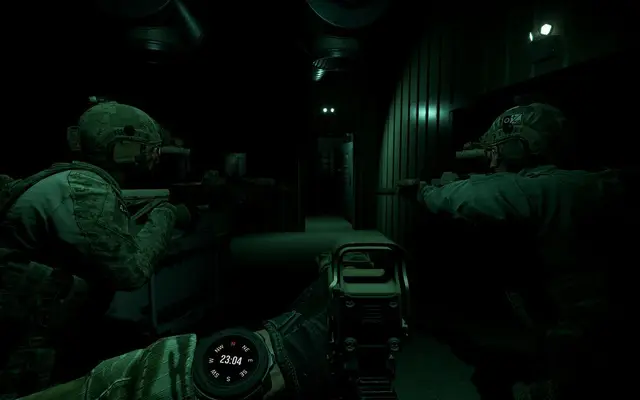
A look inside Ground Branch
Real screenshots from the game. Click any of them to see it full size.
How much RAM does a Ground Branch server need?
Find the row that sounds like your group and we will point you at the right plan.
| Your server | RAM | Plan |
|---|---|---|
| Co-op squad of up to 8 on stock maps | 6 GB | Starter$14.99/mo |
| Full 16 player PvP or co-op with lots of AI | 8 GB | Standard$19.99/mo |
| Workshop maps and mods on a busy community server | 12 GB | Pro$29.99/mo |
This is the panel. Click around.
This is the Ground Branch panel you get. Click any button, or type a command.

Ground Branch Server
play.gamezservers.com:7777
[12:00:00] Starting Ground Branch server
[12:00:03] Loading world
[12:00:06] Server started on port 7777
[12:00:09] Ready for players. Try a button.
Power
How to join your Ground Branch server
- 1
Launch Ground Branch and open the multiplayer server browser.
- 2
Filter or search for your server by name.
- 3
Join, let any Workshop mods finish syncing, then pick your loadout.
- 4
Enter the password if your server has one.
Common problems
If the server stops launching right after a game update, turn on Validate Server Files for one restart, then turn it back off.
Players with an older build can't join. When BlackFoot pushes a patch, restart the server so auto update pulls it too.
Custom game modes and missions can run server side, but mods with new maps or items have to be downloaded by every player, so expect a sync on first join.
Server not responding
Make sure the server is online. Servers sleep after 4 days with nobody playing, and anyone with access can start them again from the dashboard in one click.
Use the server address
Do not use localhost, 127.0.0.1 or your own IP from a home hosting guide. Copy the exact address of the server.
No port forwarding or firewall changes
Opening ports on your router is only for hosting a server at home, so there is nothing to change to join this one. If Windows asks whether to let the game through the firewall, choose Allow.
Modding your Ground Branch server
Ground Branch has an official mod kit and Steam Workshop support. Servers run custom game modes, missions, weapon mods and maps, and joining players are synced to the server's mod list.
Ground Branch server hosting, explained
Ground Branch is BlackFoot Studios' tactical shooter, made by a team that includes one of the developers behind the original Rainbow Six and Ghost Recon. It reached V1.0 on July 16, 2026 after a long Early Access run. Play is careful and methodical: detailed loadouts, planned entries, rooms cleared one corner at a time, and one or two hits ending your round. Co-op is built for up to 8 players against AI, while PvP fills 16 slots as 8v8.
Most groups play co-op, and a dedicated server means the squad doesn't depend on one player hosting from home and staying in the match. It also moves the AI work off someone's gaming PC. PvP crowds use servers for Team Elimination and DTAS scrims with a fixed rotation. The developers have said a dedicated multiplayer update is planned after the V1.0 campaign chapters, so a server you set up now keeps working as that lands.
Our panel covers server name, max players (16 by default), automatic updates and a validate option that repairs server files after a bad update. Map rotation, admins and mods live in the server's config files, which you edit in the file manager or over SFTP. Steam Workshop mods load on the server, and players who join get the mod sync window, which ends the usual round of asking what to subscribe to.
In Ground Branch the AI costs more than the players. A 16 player PvP lobby is lighter than you'd expect, while a co-op mission packed with AI enemies is heavier, which is why 8 or fewer humans is the advice for co-op. A squad on stock maps starts at 6 GB. Full 16 player lobbies or AI heavy co-op are better on 8 GB, and a community server with Workshop maps and mods should take 12 GB.
Ground Branch server guides
Ground Branch5 min readGround Branch Server Config: Server.ini, MapList.ini and Admin.ini
How to edit a Ground Branch server's config files: Server.ini settings, MapList.ini rotation lines, Admin.ini groups and admins, plus Ban.ini and Vote.ini.
ReadGround Branch5 min readGround Branch Server Not Showing in Browser or Can't Join (Fixes)
Ground Branch server missing from the browser or players cannot join? Fix the query port, version mismatch, filters, mod sync and startup errors.
ReadGround Branch5 min readHow to Host a Ground Branch Dedicated Server (V1.0 Guide)
Host a Ground Branch dedicated server: SteamCMD app 476400, ports 7777 and 27015 UDP, Server.ini, MapList.ini and Admin.ini, plus co-op and PvP sizing.
ReadIncluded on every plan
- Always on DDoS protection
- 24/7 support from real people
- Low ping game hardware
- Live the moment you pay
- Your own address and port
- Live console with full access
- One click game actions
- One click backups
- Upgrade or cancel any time
Common questions
How many players can join a Ground Branch server?
Up to 16. Co-op is designed for up to 8 against AI, and PvP uses all 16 as 8v8. Our default is 16 and you can lower it with Max Players.
Does a Ground Branch server support mods?
Yes. It runs Steam Workshop mods made with the official mod kit, and players get them through the mod sync when they join.
Which game modes can I run?
Co-op has Terrorist Hunt, Intel Retrieval and Defuse. PvP has Team Elimination, Hostage Rescue, Deathmatch, Defend and DTAS.
How do players find my server?
Through the in game server browser, which filters by game mode, map, player count and ping. Search for your server name and join.
Is Ground Branch out of Early Access?
Yes. V1.0 released on July 16, 2026, with campaign chapters and a multiplayer update planned after it.
What does Validate Server Files do?
It checks the installed server files against Steam and replaces anything missing or corrupt. Turn it on for a restart if the server stops launching after an update.
Can console players join?
No. Ground Branch is a Windows PC game on Steam only.
Do players need to own the game?
Yes, every player needs Ground Branch on Steam. The dedicated server is a free separate build that we install and update.
Is GamezServers affiliated with Ground Branch?
No. You rent and control your own dedicated Ground Branch server. GamezServers is not affiliated with the game's developer or publisher.
Can my friends and I split the cost?
Yes. At checkout choose "Me and my friends" and up to 10 people each pay their own share with their own card, on any plan length, from 3 days to a year. It is not a payment plan: nobody pays in parts over time, each friend simply pays their own share. You pay yours, send each friend their link, and the server starts straight away. Each share includes a $1 payment fee.
Can I build a custom plan?
Yes. Every game has a Build your own page: pick any amount of RAM up to 32 GB, any length from 3 days to 1 year, prepaid or a subscription, plus your server type and settings. A custom size costs 15% more per GB than the standard plans next to it.
Can I pay once instead of a subscription?
Yes. Pick Prepaid and pay once for 3 days, 30 days, 6 months or a year. Nothing renews: when the time is up the server pauses and keeps its world for 14 days. Add time or switch to a subscription from your panel any time. Short rentals cost more per day, since every server is set up from scratch.
How fast is setup, really?
Your server starts building the moment Stripe confirms payment. Most are online in under a minute, and the address and login appear on your dashboard automatically.

Your Ground Branch server is a minute away
Slow, careful tactical ops: Ground Branch co-op or 8v8 PvP
Deploy Ground Branch nowLive in 60 seconds · Cancel any time
GamezServers is not affiliated with BlackFoot Studios. Ground Branch and its art are trademarks of their respective owners.