

Barotrauma server hosting
Crew your own Barotrauma sub with friends, mods and your rules
Host a Barotrauma dedicated server for a crew of up to 16: multiplayer campaign, traitors, Workshop mods like Neurotrauma and a sub that sails without a host.
Staying longer? Subscribe and get 50% off your first month
- DDoS protected
- 24/7 support
- Live the moment you pay
- Split the billUp to 10 friends, own cards
- Custom plansAny RAM up to 32 GB
- Prepaid or monthly3 days to 1 year
- Live in 60 secondsNo setup, no waiting
- Cancel any timeNo contracts, ever
Pick your Barotrauma plan
Every plan is live the moment you pay. Upgrade or cancel from your dashboard any time.
Starter
2 GBThen $4.99/mo. $0.17 a day.
- 2 GB RAM
- 2 vCPU cores
- DDoS protection included
- 24/7 support
Standard
4 GBThen $9.99/mo. $0.33 a day.
- 4 GB RAM
- 2 vCPU cores
- DDoS protection included
- 24/7 support
Pro
8 GBThen $19.99/mo. $0.67 a day.
Splitting with 3 friends? $6.02 each/mo
- 8 GB RAM
- 2 vCPU cores
- DDoS protection included
- 24/7 support
What comes set up on a Barotrauma server
Campaign without a host
The multiplayer campaign save lives on the server, so the crew can keep sailing even when the captain is offline.
Workshop mods
Run Neurotrauma, Lua For Barotrauma and custom subs. Players are offered the same mods when they join.
Up to 16 crew
Fill every station from captain to medic, or keep a tight crew of four with bots covering the rest.
Traitors and rules
Turn traitors, friendly fire, karma and respawn shuttles on or off in the server settings to suit your crew.
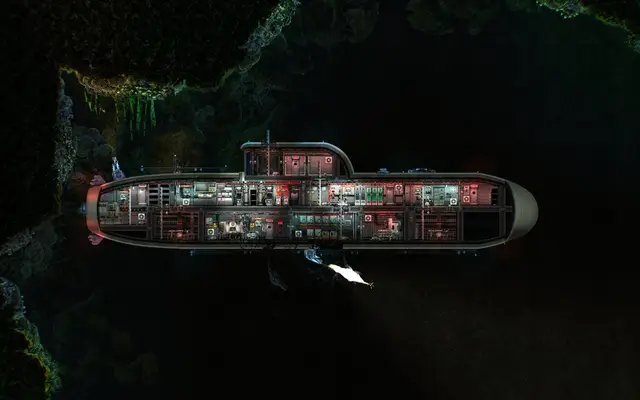
A look inside Barotrauma
Real screenshots from the game. Click any of them to see it full size.
How much RAM does a Barotrauma server need?
Find the row that sounds like your group and we will point you at the right plan.
| Your server | RAM | Plan |
|---|---|---|
| Small crew, vanilla or light mods | 2 GB | Starter$4.99/mo |
| Full crew or a long modded campaign | 4 GB | Standard$9.99/mo |
| 16 players with heavy Lua mods and big subs | 8 GB | Pro$19.99/mo |
This is the panel. Click around.
This is the Barotrauma panel you get. Click any button, or type a command.

Barotrauma Server
play.gamezservers.com:7777
[12:00:00] Starting Barotrauma server
[12:00:03] Loading world
[12:00:06] Server started on port 7777
[12:00:09] Ready for players. Try a button.
Power
How to join your Barotrauma server
- 1
Launch Barotrauma and open the Server Browser from the main menu.
- 2
Search the list for your server's name, or click Direct Join and enter
203.0.113.24. - 3
Enter the password if the server has one.
- 4
Accept the download for any missing mods, then pick your job in the lobby.
Common problems
Mods on a dedicated server must be copied into LocalMods and listed in config_player.xml. Mods that need Lua For Barotrauma only work once it is installed on the server too.
Players stuck on missing content need the same mod versions as the server. Update the server's mod files after a Workshop update, then restart.
Server name, password, player count and game rules are in serversettings.xml. Edit it with the server stopped, or your changes get overwritten on shutdown.
Server not responding
Make sure the server is online. Servers sleep after 4 days with nobody playing, and anyone with access can start them again from the dashboard in one click.
Use the server address
Do not use localhost, 127.0.0.1 or your own IP from a home hosting guide. Copy the exact address of the server.
No port forwarding or firewall changes
Opening ports on your router is only for hosting a server at home, so there is nothing to change to join this one. If Windows asks whether to let the game through the firewall, choose Allow.
Modding your Barotrauma server
Barotrauma's Steam Workshop is huge: medical overhauls, new subs, weapons and Lua scripted systems. Server mods are copied to LocalMods and enabled in config_player.xml.
Barotrauma server hosting, explained
Barotrauma puts a crew inside a submarine under the ice of Jupiter's moon Europa, where everything leaks, breaks or tries to eat you. Each player takes a job: captain, engineer, mechanic, security, medic or assistant, and the sub only survives if people do theirs. It is mostly co-op, with traitor modes for groups who like a bit of betrayal. A full crew is chaos in the best way: fires in the reactor room, a hull breach in ballast and a medic who just wants everyone to sit still.
Hosting from inside the game ties the campaign to one person's PC. A dedicated server keeps the campaign save, the sub and the crew's progress available to everyone, and it is the better choice for mod heavy setups. Friend groups run weekly campaign nights, and roleplay and community servers run long campaigns with strict rules, karma and custom subs. A server that is always up also makes it easy to fill a crew on short notice.
Server settings cover game mode, traitors, friendly fire, karma, respawns, bots, max players and passwords. They live in serversettings.xml, which you edit in the file manager, and Auto Update keeps the server on the current version. Workshop mods are copied into LocalMods over SFTP and enabled in config_player.xml, and players are offered the same mods when they join. Admin rights are handed out with ranks and permissions from the server console.
Barotrauma is fairly light on memory compared with 3D survival games, because the world is a 2D sub and a stretch of ocean. A small crew runs on 2 GB. A full crew or a long modded campaign is comfortable on 4 GB, and 16 players with heavy Lua mods and large custom subs should use 8 GB. You can change plans at any time without losing the campaign.
Barotrauma server guides
Barotrauma5 min readHow to Become Admin on a Barotrauma Dedicated Server
Give yourself admin on a Barotrauma dedicated server with giverank from the server console or clientpermissions.xml, plus the ranks, permissions and commands.
ReadBarotrauma6 min readHow to Host a Barotrauma Server (2026 Guide)
Host a Barotrauma dedicated server: SteamCMD app 1026340, serversettings.xml, UDP 27015 and 27016, Workshop mods in LocalMods and keeping campaign saves safe.
ReadBarotrauma5 min readHow to Install Mods on a Barotrauma Dedicated Server
Install Workshop mods on a Barotrauma dedicated server: copy them into LocalMods, list them in config_player.xml in load order, and set up Lua mods properly.
ReadBarotrauma5 min readHow to Move a Barotrauma Campaign to a Dedicated Server
Move a Barotrauma multiplayer campaign to a dedicated server: the .save and _CharacterData.xml pair, the server's hidden save folder, and loading it.
ReadIncluded on every plan
- Always on DDoS protection
- 24/7 support from real people
- Low ping game hardware
- Live the moment you pay
- Your own address and port
- Live console with full access
- One click game actions
- One click backups
- Upgrade or cancel any time
Common questions
How many players can join a Barotrauma server?
Up to 16 is the standard limit. Set a lower number in serversettings.xml if you want a tighter crew, and let bots fill the missing jobs.
Can I play the campaign on a dedicated server?
Yes. The multiplayer campaign runs on dedicated servers, and the save stays on the server so the crew can continue without the original host.
How do I add mods?
Subscribe to the mods on your own PC, copy their folders into the server's LocalMods folder, and list them in config_player.xml. Restart, and players are offered the same mods when they join.
Do players need the same mods as the server?
Yes. Everyone needs matching versions, and the game prompts players to download what is missing when they join.
Do Lua mods like Neurotrauma work?
Yes, once Lua For Barotrauma is installed on the server as well as on each player's game. Install it first and list it before the mods that depend on it.
Where do I change server settings?
In serversettings.xml in the file manager. Stop the server before editing so your changes are not overwritten.
How do I get admin on my server?
Grant yourself permissions in the server's client permissions file, or use the server console in the panel to give a connected player rights with the giveperm or giverank command.
How much RAM does a Barotrauma server need?
2 GB for a small vanilla crew, 4 GB for a full crew or modded campaign, and 8 GB for 16 players with heavy Lua mods.
Is GamezServers affiliated with Barotrauma?
No. You rent and control your own dedicated Barotrauma server. GamezServers is not affiliated with the game's developer or publisher.
Can my friends and I split the cost?
Yes. At checkout choose "Me and my friends" and up to 10 people each pay their own share with their own card, on any plan length, from 3 days to a year. It is not a payment plan: nobody pays in parts over time, each friend simply pays their own share. You pay yours, send each friend their link, and the server starts straight away. Each share includes a $1 payment fee.
Can I build a custom plan?
Yes. Every game has a Build your own page: pick any amount of RAM up to 32 GB, any length from 3 days to 1 year, prepaid or a subscription, plus your server type and settings. A custom size costs 15% more per GB than the standard plans next to it.
Can I pay once instead of a subscription?
Yes. Pick Prepaid and pay once for 3 days, 30 days, 6 months or a year. Nothing renews: when the time is up the server pauses and keeps its world for 14 days. Add time or switch to a subscription from your panel any time. Short rentals cost more per day, since every server is set up from scratch.
How fast is setup, really?
Your server starts building the moment Stripe confirms payment. Most are online in under a minute, and the address and login appear on your dashboard automatically.
Your Barotrauma server is a minute away
Crew your own Barotrauma sub with friends, mods and your rules
Deploy Barotrauma nowLive in 60 seconds · Cancel any time
GamezServers is not affiliated with FakeFish & Undertow Games. Barotrauma and its art are trademarks of their respective owners.