


ARK: Survival Evolved server hosting
Your tribe's own ARK with the map, rates and mods you choose
Rent an ARK: Survival Evolved server with any official map, Workshop mods by ID, custom rates and BattlEye. Run PvE for your tribe or PvP for a whole cluster.
Staying longer? Subscribe and get 50% off your first month
- DDoS protected
- 24/7 support
- Live the moment you pay

- Split the billUp to 10 friends, own cards
- Custom plansAny RAM up to 32 GB
- Prepaid or monthly3 days to 1 year
- Live in 60 secondsNo setup, no waiting
- Cancel any timeNo contracts, ever
Pick your ARK: Survival Evolved plan
Every plan is live the moment you pay. Upgrade or cancel from your dashboard any time.
Starter
8 GBThen $19.99/mo. $0.67 a day.
Splitting with 3 friends? $6.02 each/mo
- 8 GB RAM
- 2 vCPU cores
- DDoS protection included
- 24/7 support
Standard
12 GBThen $29.99/mo. $1.00 a day.
Splitting with 3 friends? $8.52 each/mo
- 12 GB RAM
- 3 vCPU cores
- DDoS protection included
- 24/7 support
Pro
16 GBThen $39.99/mo. $1.33 a day.
Splitting with 3 friends? $11.02 each/mo
- 16 GB RAM
- 4 vCPU cores
- DDoS protection included
- 24/7 support
Elite
24 GBThen $59.99/mo. $2.00 a day.
Splitting with 3 friends? $16.02 each/mo
- 24 GB RAM
- 6 vCPU cores
- DDoS protection included
- 24/7 support
What comes set up on a ARK: Survival Evolved server
Any official map
Pick The Island, Ragnarok, Valguero, Genesis, Fjordur and more from the Server Map setting, then restart to switch.
Your own rates
Set taming, harvest and XP multipliers in GameUserSettings.ini and Game.ini so nobody has to grind for weeks.
Workshop mods by ID
Paste Workshop mod IDs in load order and the server downloads them on start. Players get them when they join.
Backups before wipes
Take a one click backup before a big update, a mod change or a raid weekend, and restore it if something breaks.
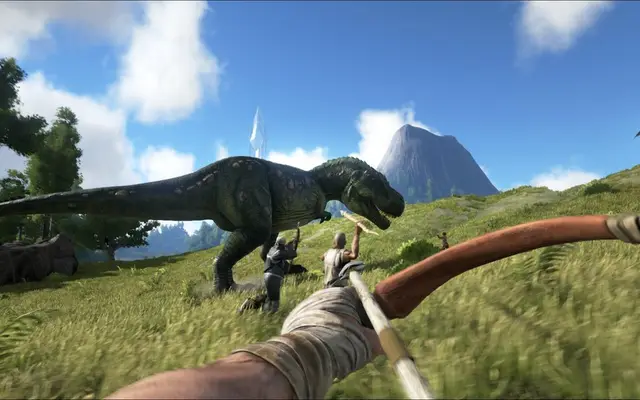
A look inside ARK: Survival Evolved
Real screenshots from the game. Click any of them to see it full size.
How much RAM does a ARK: Survival Evolved server need?
Find the row that sounds like your group and we will point you at the right plan.
| Your server | RAM | Plan |
|---|---|---|
| The Island or Ragnarok, small tribe, light mods | 8 GB | Starter$19.99/mo |
| Larger maps or a modded server with 10 to 20 players | 12 GB | Standard$29.99/mo |
| Genesis or Fjordur with big mods and many players | 16 GB | Pro$39.99/mo |
This is the panel. Click around.
This is the ARK: Survival Evolved panel you get. Click any button, or type a command.

ARK: Survival Evolved Server
play.gamezservers.com:7777
[12:00:00] Starting ARK: Survival Evolved server
[12:00:03] Loading world
[12:00:06] Server started on port 7777
[12:00:09] Ready for players. Try a button.
Power
How to join your ARK: Survival Evolved server
- 1
Launch ARK: Survival Evolved and click Join ARK.
- 2
Set the session filter to Unofficial and search for your server's name, or open the console with Tab.
- 3
In the console, type
openand press Enter.203.0.113.24 - 4
Enter the server password if you set one, then pick a spawn point.
Common problems
Your server not in the list? Set the filter to Unofficial, tick Show Password Protected Servers, or skip the list and type open in the console.203.0.113.24
Players get kicked for mod mismatches after a mod updates. Restart the server so it pulls the new mod versions, and have players restart their game too.
Big DLC maps like Genesis Part 2 need a lot of memory before anyone joins. Check your plan before switching, or the server can run out of memory while loading.
Server not responding
Make sure the server is online. Servers sleep after 4 days with nobody playing, and anyone with access can start them again from the dashboard in one click.
Use the server address
Do not use localhost, 127.0.0.1 or your own IP from a home hosting guide. Copy the exact address of the server.
No port forwarding or firewall changes
Opening ports on your router is only for hosting a server at home, so there is nothing to change to join this one. If Windows asks whether to let the game through the firewall, choose Allow.
Modding your ARK: Survival Evolved server
ARK has one of the biggest Steam Workshop libraries of any survival game. Server owners load mods by Workshop ID, and popular picks add building parts, dino storage and quality of life tools.
ARK: Survival Evolved server hosting, explained
ARK: Survival Evolved drops players on an island full of dinosaurs with nothing, and lets them work up to tamed armies, flying mounts and fortified bases. Multiplayer can be anything from a few friends taming in peace on PvE to tribes raiding each other's walls in the middle of the night. Most private servers land in between, with boosted rates so nobody has to grind for weeks to get their first flyer.
Official servers mean someone else's rates, someone else's wipes and other tribes squatting on your favorite spot. Your own server lets you choose the map, tune taming, harvest and breeding rates, set an admin password for console commands and decide whether BattlEye runs. Clan servers, PvE communities and modded roleplay servers all start this way, and many groups keep one map running for years.
The panel has the map, server name, password, admin password, max players, BattlEye, auto update and a Mods field that takes Workshop IDs in load order. Everything else lives in GameUserSettings.ini and Game.ini, which you edit in the file manager: rates, PvE or PvP, structure limits, and per level stats. The Additional Arguments field takes launch flags such as -crossplay for Epic players. Admins log in in game with enablecheats and the admin password.
ARK is heavy, and the map matters most. The Island alone takes a few gigabytes empty, while the large DLC maps can need 10 GB before anyone joins, and every player and mod adds more on top. Our 8 GB plan fits The Island or Ragnarok for a small tribe. Pick 12 GB for larger maps or a modded server, 16 GB for Genesis or Fjordur with mods, and 24 GB for big modded communities.
ARK: Survival Evolved server guides
ARK: Survival Evolved5 min readARK Survival Evolved Server Hosting Cost by Map (2026)
What an ARK: Survival Evolved server costs per month on The Island, Ragnarok, Genesis or Fjordur, with mods, and how it compares to hosting ARK: Survival Ascended.
ReadARK: Survival Evolved5 min readARK Survival Evolved Server Not Showing Up? How to Fix It
Fix an ARK Survival Evolved (ASE) server missing from the unofficial list: filters, query port 27015, Steam favorites, open command, versions, mods, BattlEye and Epic.
ReadARK: Survival Evolved6 min readHow to Host an ARK Survival Evolved Server (2026 Guide)
Host an ARK Survival Evolved server: SteamCMD app 376030, launch line, GameUserSettings.ini rates, map names, Workshop mods, clusters and ports.
ReadARK: Survival Evolved5 min readHow to Install Mods on an ARK Survival Evolved Server
Add Steam Workshop mods to an ARK Survival Evolved server: Workshop IDs, ActiveMods load order, -automanagedmods, mod maps and why Epic players get locked out.
ReadARK: Survival Evolved5 min readHow to Move an ARK Survival Evolved Save to a Server
Move an ARK Survival Evolved single player or non-dedicated save to a dedicated server: the .ark map file, renaming LocalPlayer.arkprofile, and tribe files.
ReadIncluded on every plan
- Always on DDoS protection
- 24/7 support from real people
- Low ping game hardware
- Live the moment you pay
- Your own address and port
- Live console with full access
- One click game actions
- One click backups
- Upgrade or cancel any time
Common questions
How many players can an ARK server hold?
You set the slot count with Max Players, and the default is 12. Official servers ran 70 players, but on your own server memory and CPU set the real limit.
How do I add mods to my ARK server?
Put the Workshop mod IDs in the Mods setting, separated by commas, in load order. Restart and the server downloads them, and players get them when they join.
How do I change the map?
Set Server Map to the map's name, such as TheIsland, Ragnarok or Valguero_P, and restart. Each map has its own save, so you can switch back later.
How do I change taming and harvest rates?
Edit GameUserSettings.ini and Game.ini in the file manager with the server stopped, then start it. Common settings are TamingSpeedMultiplier and HarvestAmountMultiplier.
How do I use admin commands?
Open the console with Tab and type enablecheats followed by your admin password. After that you can use admin commands like cheat fly or cheat saveworld.
Can Epic Games players join?
ARK on Epic can play with Steam on servers started with -crossplay. Add it to the Additional Arguments setting and restart.
How do I find my server if it isn't in the list?
Open the console in game and type open followed by the server address. You can also add the server to your Steam favorites under View, Game Servers.
How much RAM does an ARK server need?
At least 8 GB for The Island with a small group. Larger maps, mods and more players push it to 12 or 16 GB, and big modded communities to 24 GB.
Is GamezServers affiliated with ARK: Survival Evolved?
No. You rent and control your own dedicated ARK: Survival Evolved server. GamezServers is not affiliated with the game's developer or publisher.
Can my friends and I split the cost?
Yes. At checkout choose "Me and my friends" and up to 10 people each pay their own share with their own card, on any plan length, from 3 days to a year. It is not a payment plan: nobody pays in parts over time, each friend simply pays their own share. You pay yours, send each friend their link, and the server starts straight away. Each share includes a $1 payment fee.
Can I build a custom plan?
Yes. Every game has a Build your own page: pick any amount of RAM up to 32 GB, any length from 3 days to 1 year, prepaid or a subscription, plus your server type and settings. A custom size costs 15% more per GB than the standard plans next to it.
Can I pay once instead of a subscription?
Yes. Pick Prepaid and pay once for 3 days, 30 days, 6 months or a year. Nothing renews: when the time is up the server pauses and keeps its world for 14 days. Add time or switch to a subscription from your panel any time. Short rentals cost more per day, since every server is set up from scratch.
How fast is setup, really?
Your server starts building the moment Stripe confirms payment. Most are online in under a minute, and the address and login appear on your dashboard automatically.



Your ARK: Survival Evolved server is a minute away
Your tribe's own ARK with the map, rates and mods you choose
Deploy ARK: Survival Evolved nowLive in 60 seconds · Cancel any time
GamezServers is not affiliated with Studio Wildcard. ARK: Survival Evolved and its art are trademarks of their respective owners.