

 OpenRA: Red Alert
How to Play OpenRA Red Alert Co-op Against Bots With Friends
Team up against the AI in OpenRA Red Alert on a dedicated server: Humans vs Bots, the four Red Alert AIs, fair lobby settings and how to make bots harder.
Updated Oct 7, 2026 · 5 min read
On this page
- Why co-op against AI works so well in Red Alert
- Step 1: Get everyone into one lobby
- Step 2: Pick a map with room
- Step 3: Add bots
- Step 4: Put humans on one team
- Step 5: Set fair options
- Making it harder or easier
- Playing alone against bots on a dedicated server
- Keeping a co-op night running smoothly
- A lobby that is always there
- FAQ
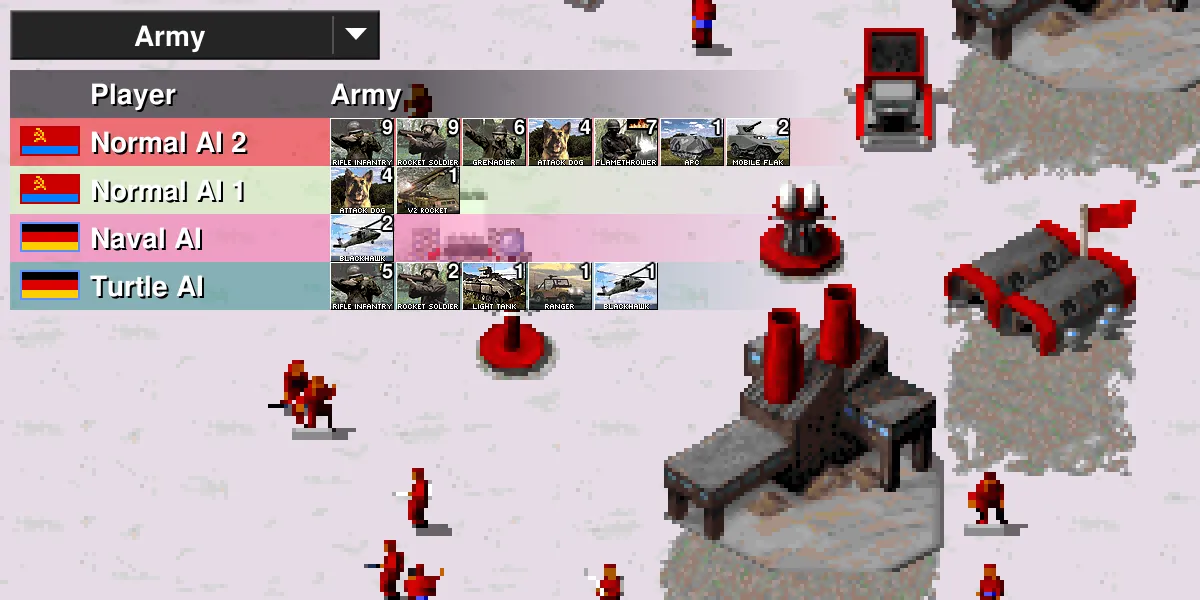
To play OpenRA Red Alert co-op against bots, have everyone join the same lobby, let the lobby admin open Configure Bots and add AI players to the empty slots, then use Configure Teams and pick Humans vs Bots so all players share one team. Red Alert ships four AIs: Rush, Normal, Turtle and Naval. Pick a map with enough slots, set the options below and start. On a dedicated server, the first player into the empty lobby is the admin who does all of this.
Why co-op against AI works so well in Red Alert
Not everyone in a friend group wants to get flattened in a 1v1 by the one person who watches tournament replays. Humans vs Bots evens that out: the strong player covers the weak flank, new players learn build orders without being punished for it, and everyone wins or loses together. The Red Alert AIs are good enough to put up a fight on most maps, and you can scale the challenge by changing how many bots you face and which kind.
Step 1: Get everyone into one lobby
You need a lobby all players can reach. Two options:
- One player hosts from Multiplayer, Create Server. Works for a quick game, but the lobby disappears if that player leaves, and they may need to forward a port.
- A dedicated server that is always running. Everyone uses Direct Connect or finds it in the browser. See how to host an OpenRA Red Alert server.
Everyone must be on the same OpenRA release, or they will not see or join the lobby.
Step 2: Pick a map with room
Bots need slots. A 2 player map leaves no room for AI if two friends join, so filter the map chooser by player count. For two humans against two bots, a 4 player map works. For three humans against three or four bots, look for 6 or 8 player maps.
Water matters too. On maps with lots of sea, the Naval AI becomes a real threat and the others make more sense on land heavy maps.
Step 3: Add bots
Above the player list, the admin has two buttons:
- Configure Bots: Add fills every open slot with an AI, Remove clears them all.
- Each empty slot also has a dropdown, where you can set it to Open, Closed, or a specific AI.
The four Red Alert AIs:
| AI | Plays like |
|---|---|
| Rush AI | Attacks early and often. Good for teaching your group to defend |
| Normal AI | A balanced opponent. The best starting point |
| Turtle AI | Builds up defences and expands slowly, then hits hard late |
| Naval AI | Leans on the navy. Dangerous on water maps, weak on land locked ones |
Mix them for variety. Two Normal bots plus a Rush bot gives an early scare and a solid mid game. Close any slot you do not want filled, so a stray player does not wander in as a third team.
Step 4: Put humans on one team
Click Configure Teams and choose Humans vs Bots. Every human goes on one team, every AI on the other. Check the team numbers in the player list before starting. If a bot ended up on your side, change its team number by hand.
Pick your countries while you are there. Allied countries and Soviet countries have different special units and abilities, and in a co-op game it is fun to split them: one player as the Soviets holding the front with heavy tanks, another as the Allies sneaking spies and Chrono Tanks around.
Step 5: Set fair options
These lobby options shape a co-op game the most:
| Option | Suggestion for co-op vs AI |
|---|---|
| Starting Cash | Higher for new players, so mistakes do not end the game early |
| Starting Units | Light Support gives you a few units to defend the first rush |
| Tech Level | Unrestricted for the full game, or No Superweapons to avoid a sudden nuke |
| Short Game | On, so the match ends when bases are gone instead of hunting the last unit |
| Redeployable MCVs | On, so you can move a base to a better ore field |
| Kill Bounties | On if you want killing units to pay, which keeps a struggling player in the game |
| Fog of War and Explored Map | Explored Map on for beginners, so they can see the terrain |
| Crates | Off for a serious game, on for chaos |
| Game Speed | Slower for new players, Default otherwise |
Starting cash and units apply to everyone, bots included. To tilt the game, change numbers of players, not the cash.
Making it harder or easier
The AIs in OpenRA do not have difficulty sliders. You scale them with numbers and personality:
- Easier: fewer bots than humans, Turtle AI (slow to attack), Light Support starting units, slower game speed.
- Harder: more bots than humans, Rush AI in the mix, Heavy Support so bots start with tanks, Naval AI on a water map.
- Brutal: two humans against six bots on an 8 player map. Bring a plan.
Playing alone against bots on a dedicated server
If one person wants to practise on the server when nobody else is around, the server needs Server.EnableSingleplayer=True. Without it, a dedicated lobby will not start a game with only one human in it. Most private servers turn it on, because it costs nothing and makes the server useful between group nights.
Keeping a co-op night running smoothly
- Agree who joins first. That player is lobby admin. If they disconnect, admin passes to the player connected longest.
- Use a password on the server during your session so nobody takes a slot.
- Save replays. OpenRA records them by default on each player's machine, and watching a lost game back together is half the fun.
A lobby that is always there
A GamezServers OpenRA Red Alert server keeps a Red Alert lobby online at its own address, so co-op night starts with Direct Connect instead of someone hosting. Turn on single player, set a password and choose public or private in the control panel. It fits on the smallest plan and the group can split the cost between up to 10 players.
FAQ
Can you play OpenRA Red Alert co-op against AI?
Yes. Add bots in the lobby with Configure Bots, then set Configure Teams to Humans vs Bots.
Which AIs does OpenRA Red Alert have?
Rush AI, Normal AI, Turtle AI and Naval AI.
How do I make OpenRA bots harder?
Face more bots than there are humans, include Rush AI, and give everyone Heavy Support starting units. There is no difficulty slider.
Why can I not start a game alone on my dedicated server?
The server has single player disabled. Start it with Server.EnableSingleplayer=True.
Skip the setup. Your own OpenRA: Red Alert server.
Then $2.99/mo. Just trying it? $0.75 for 3 days
 Minecraft