

 Clone Hero
Clone Hero Can't Connect to Server: Fixes for Online Join Errors
Clone Hero not connecting to a server? Check the game version, Regular mode, UDP port 14242, the firewall and the password, in that order.
Updated Oct 7, 2026 · 5 min read
On this page
When Clone Hero will not connect to a server, it is almost always one of five things: the game and server are on different versions, the game is in Leaderboards mode, the port is not open for UDP, a firewall is blocking the game, or the address or password was typed wrong. Work through them in that order and most joins start working within a few minutes. Song problems are a separate issue, covered at the end.
1. Match the version
Clone Hero online is strict about versions. Every player and the server should run the same build. After a new release, the people who updated cannot join a server still on the old one, and the people who did not update cannot join a new one.
- Check the version on the game's main menu for every player.
- If you run the standalone server yourself, download the matching server build from clonehero.net and restart it.
- If your group is not ready to update, everyone can stay on the older build together. What matters is that it is the same.
The official wiki's first answer for connection trouble is "your game needs to be up to date", and it is right more often than anything else on this list.
2. Switch to Regular mode
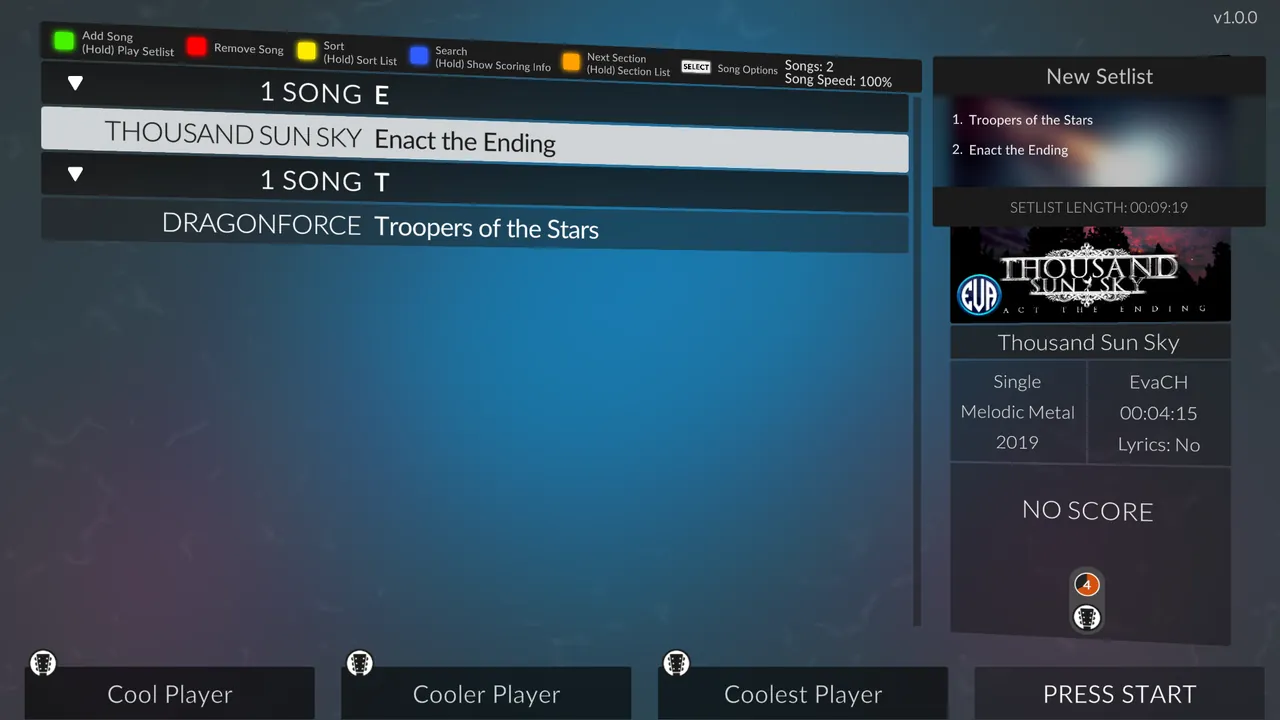
Clone Hero v1.1 (released in 2026) added official Leaderboards. In Leaderboards mode only single player Quickplay is available, so online play is hidden or unavailable. Players coming back after the update often miss this.
Go back to the main menu, switch the mode to Regular, and open Online again.
3. Check the address, port and password
The Join Server screen saves what you typed. A single wrong digit there will fail every time without a helpful message.
- In Online, open Join Server and select the saved entry.
- Check the IP. It should be the server's public address, not a
192.168.x.xlocal address, unless you are on the same home network. - Check the port. The default is 14242, but a hosted server or a custom setup may use a different one. Use exactly the one the host gives you.
- Check the password. It is case sensitive. If you host, stick to letters, numbers and underscores so nobody has to type symbols with a controller.
If in doubt, delete the saved entry and add it again with Orange.
4. The host's port must be open for UDP
If the server runs on someone's home PC, the router must forward its port. Clone Hero online uses UDP, and the official guide notes that TCP on its own does not work. A rule set to TCP only is a classic cause of "it works on my LAN but my friends time out."
Checklist for whoever hosts:
- Port forward 14242 (or the custom port) as UDP, or UDP and TCP, to the server PC's local IP.
- Give that PC a fixed local IP so the rule does not break after a reboot.
- Check your public IP has not changed. Many home connections get a new one now and then, and friends will keep trying the old address.
- If forwarding looks right and still fails, your provider may use carrier grade NAT, where inbound connections cannot reach you at all.
Our port forwarding guide walks through router screens. Players joining do not need to forward anything.
5. Let the game through the firewall
On Windows, the first time Clone Hero goes online, Windows Defender Firewall may ask whether to allow it. If someone clicked Cancel, the game is blocked silently.
- Open Windows Security, then Firewall & network protection.
- Choose Allow an app through firewall.
- Find Clone Hero and tick both Private and Public. If it is missing, add
Clone Hero.exefrom the game folder.
Third party antivirus suites with their own firewall need the same exception. For the host, the Server program needs it too.
6. Hamachi and VPNs
Some groups use Hamachi or another VPN to get around port forwarding. It works, but it adds failure points:
- Everyone must be in the same network and show as online (green).
- Players must use the host's VPN address, not their public IP.
- A VPN on one player's PC that is not part of the group network can route the game the wrong way. Turn it off and try again.
If the VPN keeps breaking, a server with its own public address is simpler. See hosting without port forwarding for the options.
Quick reference
| Error or symptom | Check |
|---|---|
| Connection times out | Port forward is UDP, IP is current, firewall allows the game |
| Joins then drops at once | Version mismatch between players or with the server |
| Online option missing | Leaderboards mode is on, switch to Regular |
| Rejected after entering password | Retype it, check capital letters |
| Only one friend cannot join | Their firewall, VPN or game version |
| Everyone connects but songs are grey | Different song files, not a connection problem |
When it connects but songs are locked
Getting into the lobby and seeing songs greyed out is not a connection fault. Clone Hero only allows a song when every player has an identical chart. Our guide on Clone Hero songs showing unavailable online covers sharing one pack, clearing the song cache and rescanning.
Skipping the router entirely
Most of this list is about the host's network. If you would rather not deal with router rules or a friend's PC that has to stay on, a hosted Clone Hero server has its own address and needs no port forwarding. In our panel you set the server name, the password and the Version, either latest or a fixed build so the server never runs ahead of your group. It is live about a minute after you order. If you are still deciding, our guide on how to host a Clone Hero server covers doing it yourself.
FAQ
Why does Clone Hero say it can't connect to the server?
The most common causes are a version mismatch, the host's port not open for UDP, or a firewall blocking the game. Check them in that order.
What port does Clone Hero use for online?
Port 14242 by default, over UDP. Custom servers can use a different port, so use the one the host gives you.
Why can't I see the Online menu in Clone Hero?
You are probably in Leaderboards mode, which is single player only since v1.1. Switch to Regular mode from the main menu.
Do I need to port forward to join a Clone Hero server?
No. Only the person running the server needs an open port. Players joining just need the game allowed through their firewall.
Skip the setup. Your own Clone Hero server.
Then $2.99/mo. Just trying it? $0.75 for 3 days
 Minecraft