


Trackmania (2020) server hosting
A Trackmania room for your club's races, cups and map packs
Host a Trackmania dedicated server for your club: your own match settings, track lists and passwords for up to 32 racers and 32 spectators. Always on.
Staying longer? Subscribe and get 50% off your first month
- DDoS protected
- 24/7 support
- Live the moment you pay

- Split the billUp to 10 friends, own cards
- Custom plansAny RAM up to 32 GB
- Prepaid or monthly3 days to 1 year
- Live in 60 secondsNo setup, no waiting
- Cancel any timeNo contracts, ever
Pick your Trackmania (2020) plan
Every plan is live the moment you pay. Upgrade or cancel from your dashboard any time.
Starter
2 GBThen $4.99/mo. $0.17 a day.
- 2 GB RAM
- 2 vCPU cores
- DDoS protection included
- 24/7 support
Standard
4 GBThen $9.99/mo. $0.33 a day.
- 4 GB RAM
- 2 vCPU cores
- DDoS protection included
- 24/7 support
Pro
6 GBThen $14.99/mo. $0.50 a day.
Splitting with 3 friends? $4.77 each/mo
- 6 GB RAM
- 2 vCPU cores
- DDoS protection included
- 24/7 support
What comes set up on a Trackmania (2020) server
32 racers, 32 spectators
Room for a full field plus as many watching, each with its own password if you want.
Your track list
Upload maps from Trackmania Exchange or your club and list them in the match settings file.
Server controllers
The XML-RPC port is open for a controller like PyPlanet or EvoSC to run records, votes and chat commands.
Cups and club nights
Run time attack, rounds or cup formats on a schedule your club picks, not the matchmaking queue.
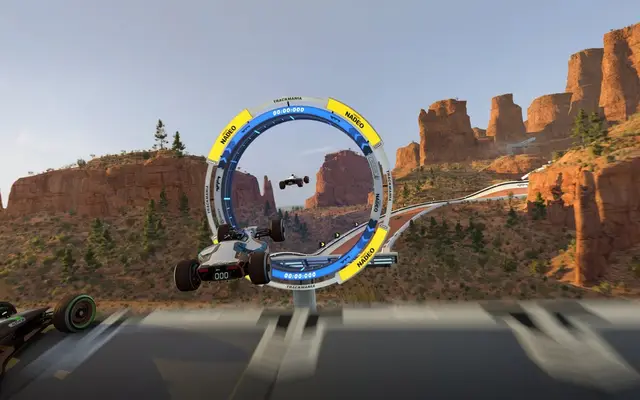
A look inside Trackmania (2020)
Real screenshots from the game. Click any of them to see it full size.
How much RAM does a Trackmania (2020) server need?
Find the row that sounds like your group and we will point you at the right plan.
| Your server | RAM | Plan |
|---|---|---|
| Club room for up to 32 racers | 2 GB | Starter$4.99/mo |
| Room with a server controller and big map pool | 4 GB | Standard$9.99/mo |
| Controller with database and many plugins | 6 GB | Pro$14.99/mo |
This is the panel. Click around.
This is the Trackmania (2020) panel you get. Click any button, or type a command.

Trackmania (2020) Server
play.gamezservers.com:7777
[12:00:00] Starting Trackmania (2020) server
[12:00:03] Loading world
[12:00:06] Server started on port 7777
[12:00:09] Ready for players. Try a button.
Power
How to join your Trackmania (2020) server
- 1
In Trackmania, open Clubs and pick your club, or create one.
- 2
In the club's administration, add a new activity with the + button and choose Room.
- 3
Choose Use Dedicated Server, name the room and pick your server's dedicated account.
- 4
Players open the club and join the room. They need the password from your panel if you set one.
Common problems
The server needs its own dedicated server account. Make one at trackmania.com and paste that login and password into the panel, not your Ubisoft login.
Dedicated servers can only be joined from the PC version. Console players need a club room that uses Select Tracks instead.
Uploaded a map and it never shows up? It also has to be listed in your match settings file. Restart after editing it.
Server not responding
Make sure the server is online. Servers sleep after 4 days with nobody playing, and anyone with access can start them again from the dashboard in one click.
Use the server address
Do not use localhost, 127.0.0.1 or your own IP from a home hosting guide. Copy the exact address of the server.
No port forwarding or firewall changes
Opening ports on your router is only for hosting a server at home, so there is nothing to change to join this one. If Windows asks whether to let the game through the firewall, choose Allow.
Modding your Trackmania (2020) server
Trackmania servers are customized with a server controller on the XML-RPC port and map packs from Trackmania Exchange. Upload maps over SFTP and point the match settings at them.
Trackmania (2020) server hosting, explained
Trackmania is Nadeo's free to play racer built around precision driving and player made tracks. Cars pass through each other as ghosts, so a server is all about chasing times rather than crashing into people. Clubs run time attack sessions, rounds, cups and knockout style events, usually on their own map packs, while the seasonal campaign and Track of the Day keep new tracks coming.
A dedicated server turns a club into a proper home. It powers a room with your own match settings, track list and passwords, and it keeps running between events so members can train any time. Leagues, school esports teams and friend groups use one so they control the format instead of waiting on matchmaking. A server also gives your club one place for its own track packs and records.
In the panel you set the server name, max players and spectators, player and spectator passwords, and the match settings file. The server signs in with a dedicated server account you create on trackmania.com, so the login and password from that page go into the panel. Maps and match settings live in the file manager, and the XML-RPC port is ready for a controller.
The Trackmania server is light, since ghost cars mean no collisions to simulate. 2 GB runs a full 32 player room with a normal track list. A controller like PyPlanet with a big map pool fits in 4 GB, and 6 GB is for a controller with its own database and many plugins. A club can split the bill between up to 10 members, each paying their share.
Trackmania (2020) server guides
Trackmania (2020)5 min readHow to Host a Trackmania Server (2020 Dedicated Server Guide)
Host a Trackmania dedicated server: create a server login on trackmania.com, set dedicated_cfg, write match settings, open port 2350 and link it to a club room.
ReadTrackmania (2020)5 min readTrackmania Club Room Can't Find Dedicated Server? Fixes
Fix a Trackmania dedicated server missing from the club room dropdown or players unable to join: server login, ports 2350, versions, passwords and PC only rooms.
ReadTrackmania (2020)4 min readTrackmania Match Settings and Custom Maps on a Dedicated Server
Edit a Trackmania match settings file: game mode scripts, S_ settings like time limit and points, adding Trackmania Exchange maps and changing the track list.
ReadIncluded on every plan
- Always on DDoS protection
- 24/7 support from real people
- Low ping game hardware
- Live the moment you pay
- Your own address and port
- Live console with full access
- One click game actions
- One click backups
- Upgrade or cancel any time
Common questions
What do I need to set up a Trackmania server?
A dedicated server login and password created on trackmania.com under your account's dedicated servers page. Put them in the Master Server Login and Password settings, then start the server.
How do players join?
Through a club room. The club owner or an admin adds a Room activity, chooses Use Dedicated Server and picks your server account. Members join from the club.
How many players can race at once?
The server starts with 32 racers and 32 spectators. Change Max Players and Max Spectators in the panel.
Can console players join?
No. Dedicated server rooms can only be joined from the PC version. Rooms without a dedicated server work cross platform.
How do I add my own tracks?
Upload the map files over SFTP into the server's maps folder and add them to your match settings file, then restart.
Can I run a server controller?
Yes. The server has an XML-RPC port, which controllers like PyPlanet and EvoSC use for records, votes and admin commands.
Can I set a spectator password?
Yes. Spectator Password is separate from the player password, so you can open a race to watchers only.
How much RAM does a Trackmania server need?
Not much. 2 GB runs a full room, and 4 GB covers a controller and a big map pool.
Is GamezServers affiliated with Trackmania (2020)?
No. You rent and control your own dedicated Trackmania (2020) server. GamezServers is not affiliated with the game's developer or publisher.
Can my friends and I split the cost?
Yes. At checkout choose "Me and my friends" and up to 10 people each pay their own share with their own card, on any plan length, from 3 days to a year. It is not a payment plan: nobody pays in parts over time, each friend simply pays their own share. You pay yours, send each friend their link, and the server starts straight away. Each share includes a $1 payment fee.
Can I build a custom plan?
Yes. Every game has a Build your own page: pick any amount of RAM up to 32 GB, any length from 3 days to 1 year, prepaid or a subscription, plus your server type and settings. A custom size costs 15% more per GB than the standard plans next to it.
Can I pay once instead of a subscription?
Yes. Pick Prepaid and pay once for 3 days, 30 days, 6 months or a year. Nothing renews: when the time is up the server pauses and keeps its world for 14 days. Add time or switch to a subscription from your panel any time. Short rentals cost more per day, since every server is set up from scratch.
How fast is setup, really?
Your server starts building the moment Stripe confirms payment. Most are online in under a minute, and the address and login appear on your dashboard automatically.



Your Trackmania (2020) server is a minute away
A Trackmania room for your club's races, cups and map packs
Deploy Trackmania (2020) nowLive in 60 seconds · Cancel any time
GamezServers is not affiliated with Nadeo. Trackmania (2020) and its art are trademarks of their respective owners.